- ⚠️ 注意事項
- ・ アイテムを購入するにはGCoinの購入が必要です。
- ・ JEWELを購入後、GCoinを購入してゲーム内アイテムを購入できます。
- ・ 保有しているJEWELが不足している場合、購入後ご利用いただけます。
- ・ アイテムの購入はゲーム内でのみ可能で、ゲーム内のすべてのサーバーでご使用いただけます。
- [返金不可ポリシー]
- - 当該商品は購入撤回が不可能な商品です。
最新情報
- ホーム
- 最新情報
- サポート

Chaos W
忘れ去られた世界の謎を解き明かす、壮大なMMORPGの冒険が今、あなたを待っています。
- #MMORPG
Game Guide
📢. [CROSS RAMP Guide]
 This guide was created based on the CROSS RAMP guide [PC Platform].
◆
◆
🚨Requirements: CROSSx App, Red Diamonds
1. Access the Main Menu
🔸Locate the Icon: Tap the [三] Menu icon located in the upper-right corner of the main game screen.
🔸Expand Options: This will bring up the full system menu, displaying all available features such as Character, Inventory, and Settings.
2. Select CROSS RAMP
🔸Find the Entry: Within the expanded menu list, look for the button labeled [CROSS RAMP] with its dedicated logo.
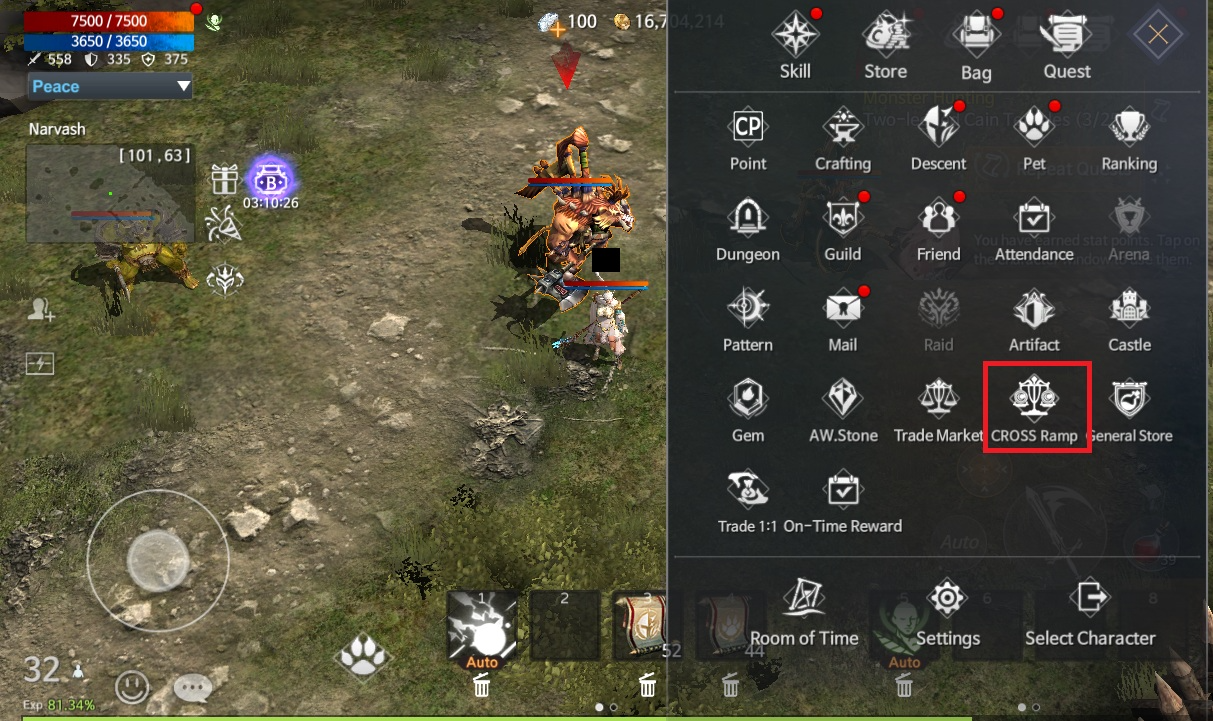
🔸Launch the Feature: Tap the button to instantly enter the CROSS RAMP interface and access its services.
▼ (Open internet browser )
3. Go to the CROSS RAMP internet browser and select ‘Assemble’ or ‘Disassemble’. and Set Value
🔸Assemble
Use this option to convert your in-game assets into tokens.
Select the ‘Assemble’ tab, choose the assets you want to use, and proceed with the conversion to mint tokens based on the defined Pair.
🔸Disassemble
Use this option to convert tokens back into in-game assets.
Select the ‘Disassemble’ tab, choose the tokens you want to break down, and receive the corresponding assets according to the Pair settings.
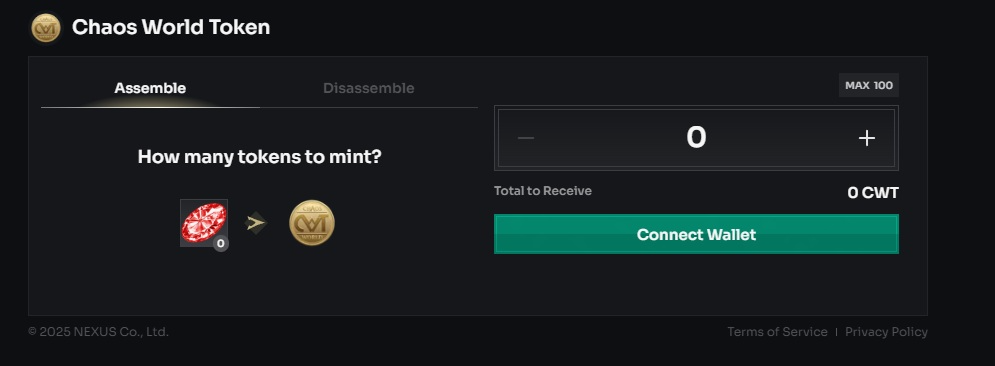
※ Please note that some Pairs may support only one direction, meaning either Assemble or Disassemble may be available, but not both.
※ You can perform one Assemble and Disassemble per attempt. To perform additional Assembles and Disassembles, you must run CROSS RAMP again.
▼ (Set Value)
🔸Set the exchange value and press the [Connect Wallet] button.
4. QR Code Identification
🔸Visual Check: A unique QR Code for authentication will be displayed in the center of your internet browser screen.
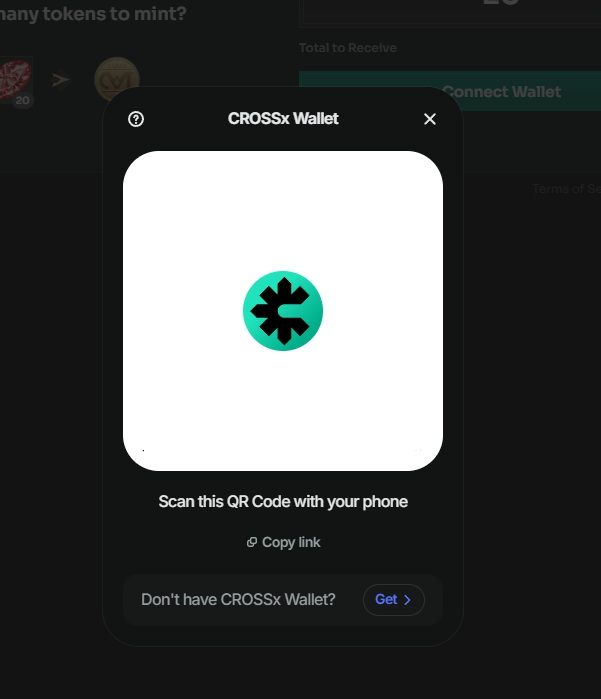
🔸Preparation: Please keep this screen active until the linking process is complete to ensure a stable connection.
5. Link via Cross Wallet App
🔸Launch the App: Open the [Cross Wallet] application on your mobile device.
🔸Scan to Connect: Locate the Scan (Camera) icon within the app and point your camera at the QR Code on the screen.
▼ (Authentication Process)
🔸Finalize Link: Once the code is recognized, follow the prompts on your phone to complete the wallet integration.
6. Final Step
🔸 After completing the authentication process, please return to the internet browser on your PC to proceed with and finalize the remaining steps.

🔑. When you purchase the [Privilege Package] in-game, the Minting fee is reduced from 20% to 0%. (Package is not used Minting fee 20%)
🔸 Once the process has been successfully completed without any issues, the entire procedure will be finished.
GCoin 購入
GCoin購入が
完了しました。
完了しました。
購入日
JEWEL
購入前 GCoin 残高
購入後 GCoin 残高






-
-
제명 Chaos W 상호 (주)밸로프 이용등급 12세 이용가 등급분류번호 GC-CC-NP-250321-002 등급분류 일자 2025-03-21 제작배급업신고번호 제 2017-000007호



読み込み中...